Learn kubectl annotate step by step: add, overwrite and remove annotations, record …
/user/kayd
@
devops
:~$
cat aurora-rds-data-api-postgresql.md
Running SQL Over HTTPS with the RDS Data API (Aurora PostgreSQL) Running SQL Over HTTPS with the RDS Data API (Aurora PostgreSQL)


Karandeep Singh
• 6 minutes
Summary
Turn on the RDS Data API for Aurora PostgreSQL and run SQL over an HTTPS endpoint with no persistent connection and no VPC, shown from both the in-console Query Editor and the AWS CLI, plus when to use it, when not to, and its limits.
Every other article in this series has fought the same enemy: to talk to the database you need a connection, which means being inside the VPC, which means security groups, an EC2 box, or cross-Region networking headaches. The RDS Data API sidesteps all of it. It gives your cluster an HTTPS endpoint where you send SQL and get JSON back, no persistent connection, no VPC, no security groups, just an IAM call. This article turns it on for Aurora PostgreSQL and runs queries two ways: from the in-console Query Editor and from the CLI.
Does enabling it reboot or interrupt anything? No. Turning the Data API on is an online change. The cluster shows a brief “Enabling” banner, but the instances stay Available, nothing restarts, and existing connections are untouched. There is also no extra charge for the API itself, you only pay for the Aurora cluster and a small Secrets Manager secret (about $0.40 per month).
What the Data API is, and why you would want it
Normally an application opens a TCP connection to port 5432, authenticates, and holds that connection (usually in a pool). That model is a poor fit for two situations:
- Serverless functions. A busy Lambda can open thousands of short-lived connections and exhaust the database, which is why people bolt on RDS Proxy.
- Callers outside the VPC. A script on your laptop, a CI job, or a lightweight service cannot reach a private database at all without a bastion or VPN.
The Data API solves both by turning queries into ordinary HTTPS requests:
Expand your knowledge with Adding an AWS Region to Aurora PostgreSQL (Global Database)
- No persistent connection. Each call is a stateless HTTP request, so there is no pool to manage and nothing to exhaust.
- No VPC required. The endpoint is public-facing and guarded by IAM, so anything with the right IAM permission and the cluster’s secret can query it, from anywhere.
- Credentials come from Secrets Manager, not passed in the call.
Requirements (all met by this cluster)
- Provisioned Aurora PostgreSQL is supported (since December 2023), not just Serverless. This is the
database-1cluster from the setup guide, running PostgreSQL 17.7. - Queries execute on the writer instance. On a global database you can enable it on any cluster, but it only serves queries where there is a writer, which is the primary.
- It uses a Secrets Manager secret holding the database credentials.
Step 1: Enable the Data API
RDS → Databases → database-1 → Actions → Enable RDS Data API. A dialog explains exactly what it does:
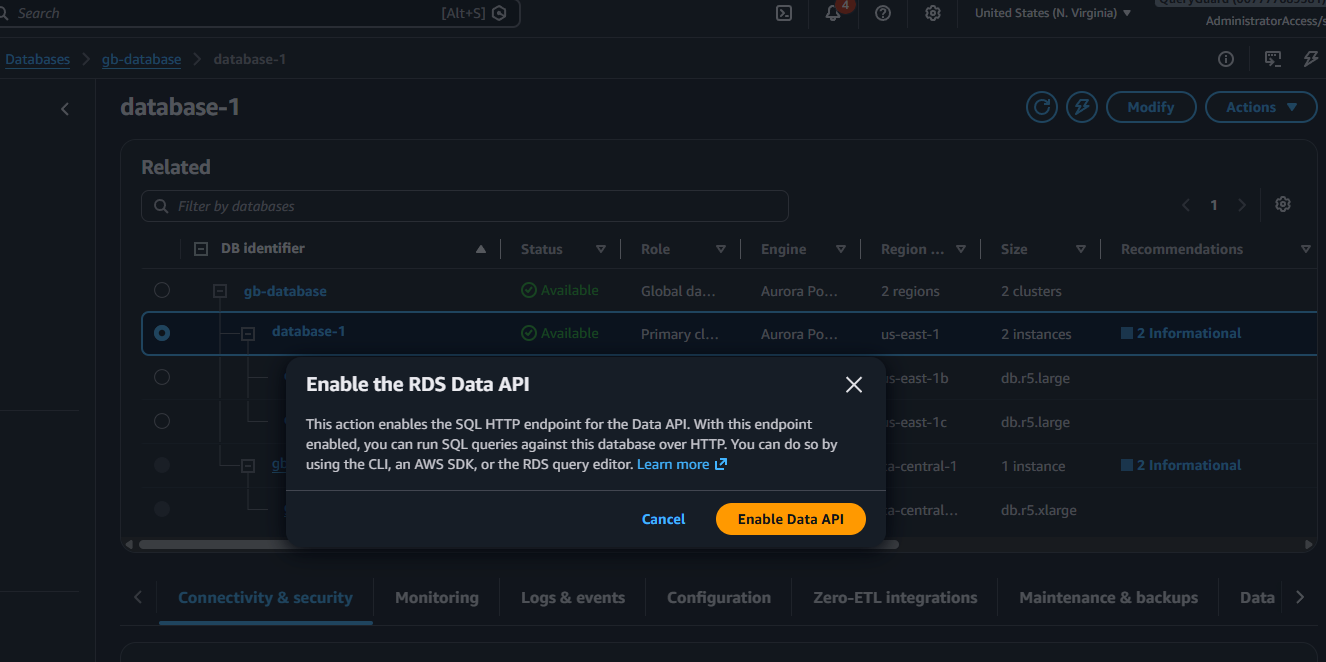
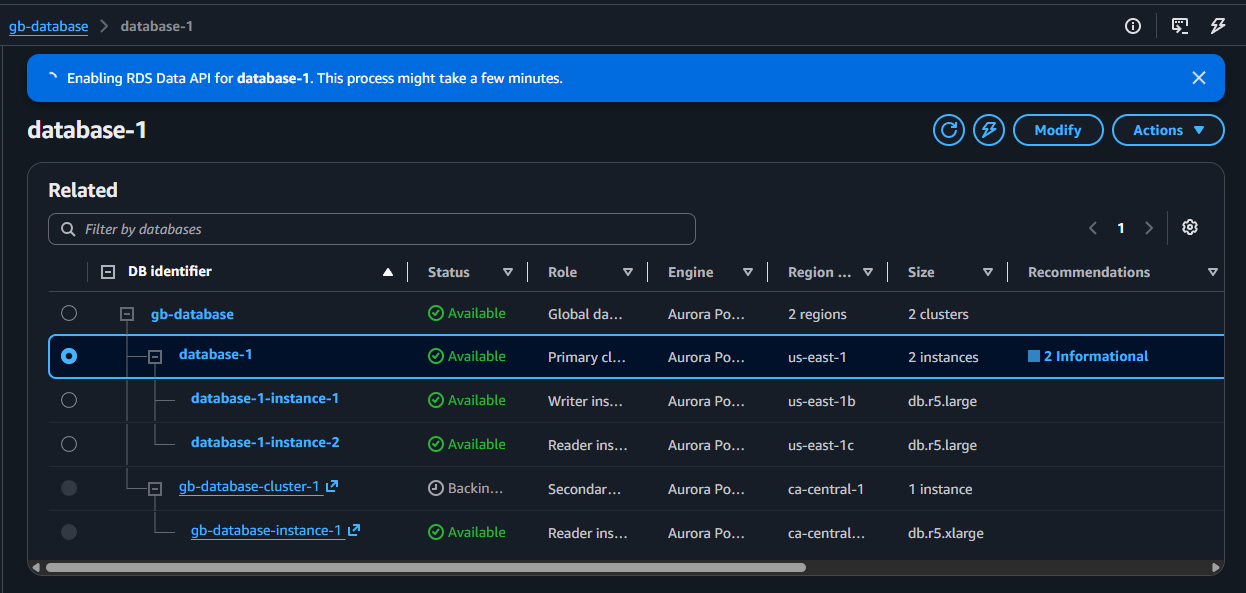
Confirm it. You get a short “Enabling” banner, and this is the part worth noticing: every instance stays Available the whole time. No reboot, no downtime:
Deepen your understanding in Adding an AWS Region to Aurora PostgreSQL (Global Database)
Step 2: Run SQL in the browser (Query Editor)
Once the API is on, a new Query Editor option appears on the cluster’s Connectivity & security tab, an in-console SQL editor that needs no tools at all:
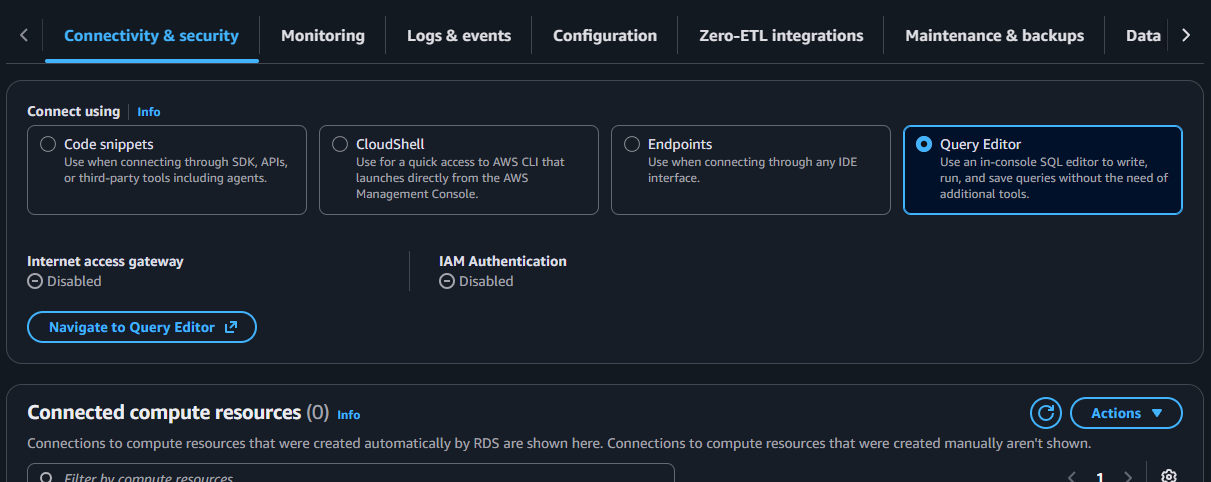
Click Navigate to Query Editor. It asks you to pick the cluster and provide credentials, which it stores as a Secrets Manager secret for you:
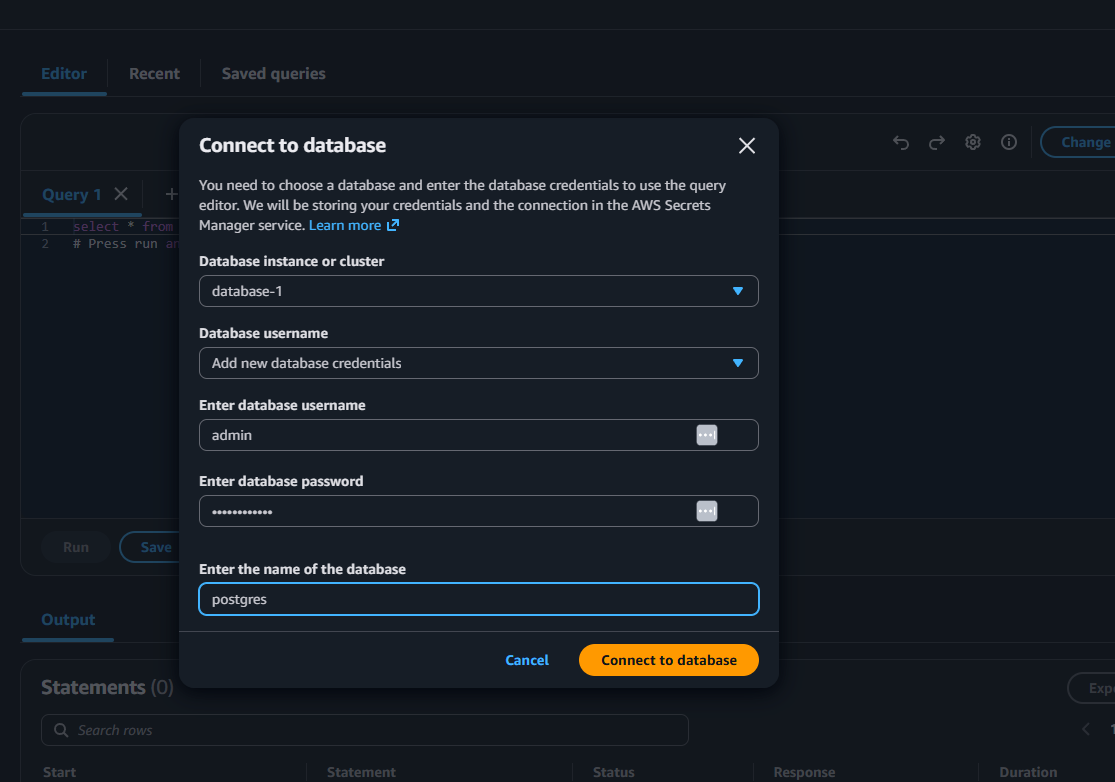
Choose database-1, enter your master username postgres and password (the master username, not admin), set the database to postgres, and connect. Then run a simple query, SELECT count(*) FROM products:
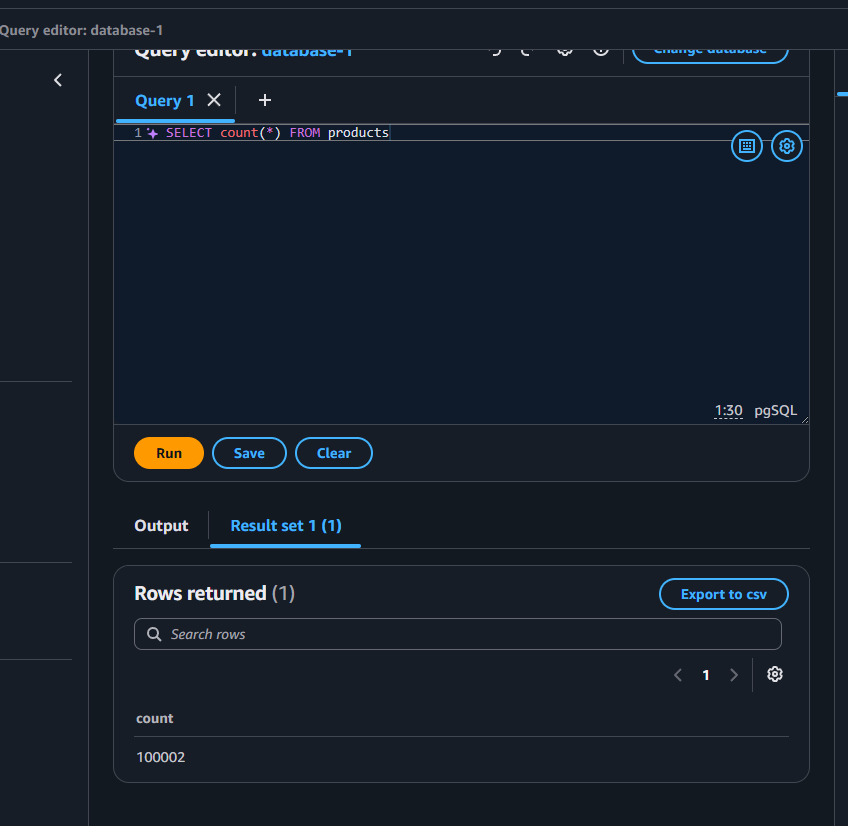
The editor runs the statement and shows 100002 rows returned (the 100000 seeded rows plus the two test rows from write forwarding and this series’ experiments).
That is SQL running against Aurora with no driver, no connection string, and no VPC, entirely over the Data API, straight from the browser.
Explore this further in Build and Deploy a Go Lambda Function
Step 3: The CLI over HTTPS (the real payoff)
The Query Editor is convenient, but the CLI shows what the Data API actually is: an HTTPS call you can make from anywhere with AWS credentials, including CloudShell or your laptop. You need two ARNs, the cluster ARN (database-1 → Configuration → ARN) and the secret ARN (from Secrets Manager):
aws rds-data execute-statement \
  --resource-arn "arn:aws:rds:us-east-1:ACCOUNT_ID:cluster:database-1" \
  --secret-arn "arn:aws:secretsmanager:us-east-1:ACCOUNT_ID:secret:rds-db-creds-XXXX" \
  --database postgres \
  --sql "SELECT count(*) FROM products"
The response is JSON, not a result grid:
{
    "records": [
        [
            { "longValue": 100002 }
        ]
    ]
}
No connection was opened, no security group was involved, and this exact call works from a Lambda function, a CI pipeline, or your terminal without any of them being inside the VPC. Parameterised statements work too, which is how you use it safely from application code:
Discover related concepts in Unix Power Tools Every DevOps Engineer Should Know
aws rds-data execute-statement \
  --resource-arn "$CLUSTER_ARN" --secret-arn "$SECRET_ARN" --database postgres \
  --sql "INSERT INTO products (name, category, price) VALUES (:n, :c, :p)" \
  --parameters '[{"name":"n","value":{"stringValue":"api-row"}},
                 {"name":"c","value":{"stringValue":"test"}},
                 {"name":"p","value":{"doubleValue":1.99}}]'
When to use it, and when not to
Reach for the Data API when:
- You are on Lambda or other serverless and want to avoid connection-pool exhaustion.
- The caller is outside the VPC, a script, a CI job, a small tool, and you do not want a bastion or VPN.
- You want quick, occasional queries or a browser console for light admin.
Avoid it when:
Uncover more details in Sed for JSON: Emergency Patterns When jq Is Unavailable
- You have a high-throughput, low-latency hot path. Each Data API call carries more overhead than reusing a pooled connection, so it is not for thousands of tiny queries per second.
- You need large result sets. Responses are capped (around 1 MB), so it is for modest queries, not bulk export.
- You rely on long-lived transactions or session state, the stateless model does not suit them.
Limits worth knowing
- Queries run on the writer only.
- Response size is capped (roughly 1 MB per call), so paginate or aggregate large results.
- It always authenticates through a Secrets Manager secret, plus the caller needs
rds-dataandsecretsmanager:GetSecretValueIAM permissions. - It is an Aurora feature, plain Amazon RDS engines do not have it.
Clean up
The Data API costs nothing on its own, so you can leave it enabled, or turn it off with Actions → Disable RDS Data API (also a no-downtime change). If you created a Secrets Manager secret only for this, delete it to avoid the small monthly charge.
Enrich your learning with Bash String Functions: Trimming, Case, and Reversal
Wrapping up
The Data API changes the shape of talking to Aurora: SQL becomes an HTTPS request with IAM auth, so serverless functions stop drowning in connections and out-of-VPC callers can query without a tunnel. Enable it with no downtime, authenticate through a secret, and use it for serverless and occasional-query workloads while keeping pooled connections for your hot paths. For the Python and shell around this, see my Python Boto3 cheatsheet and the Bash CLI cheatsheet.
Gain comprehensive insights from Adding an AWS Region to Aurora PostgreSQL (Global Database)
References and Further Reading
- Amazon Web Services. Using the RDS Data API.
- Amazon Web Services. Amazon Aurora PostgreSQL now supports RDS Data API.
- Amazon Web Services. Using the RDS Data API with the query editor.
Question
Would you route your serverless database access through the Data API, or put RDS Proxy in front of a normal connection instead?
Similar Articles
Related Content
More from cloud
Atuin replaces your shell history with a searchable database: fuzzy matching, filter by directory, …
Cut AWS Lambda cost: what you are actually billed for, why more memory is rarely cheaper, the exact …
You Might Also Like
Livestream from your phone with Amazon IVS and no code, with every channel setting explained: …
Design an AWS Lambda system for a million users an hour: capacity math, concurrency, cold starts, …
Knowledge Quiz
Test your general knowledge with this quick quiz!
A set of multiple-choice questions to test your knowledge.
Take as much time as you need.
Your score will be shown at the end.
Question 1 of 5
Score: 0
Quiz Complete!
Your score: 0 out of 5
Loading next question...
Contents