Learn kubectl annotate step by step: add, overwrite and remove annotations, record …
/user/kayd
@
devops
:~$
cat aurora-write-forwarding-postgresql.md
Aurora Write Forwarding: Writing Through a Read Replica Aurora Write Forwarding: Writing Through a Read Replica


Karandeep Singh
• 10 minutes
Summary
How Aurora write forwarding lets a read replica take writes and pass them to the writer, done hands-on with local write forwarding on Aurora PostgreSQL, plus the global cross-region variant, the latency cost, which engines support it, and why you still need an instance in every Region you serve.
Aurora readers are read-only. Send an INSERT to one and it bounces with cannot execute INSERT in a read-only transaction. That is correct and safe, but it pushes a chore onto your application: keep one connection to the writer for writes and another to a reader for reads, and route every query to the right one.
Write forwarding removes that chore. It lets a reader accept a write, quietly forward it to the writer to be committed, and hand you back the result. Your app can point a single connection at a reader and do both reads and writes. This article turns it on for real on Aurora PostgreSQL, shows the before and after, then covers the cross-region version, the latency it costs, and the limits.
Before you start: does it reboot or interrupt anything? No. AWS is explicit that enabling or disabling write forwarding does not cause a reboot or downtime, for both the local and global variants, whether you set it when creating a cluster or by modifying an existing one.
You will see the cluster and its instances briefly flip to Modifying in the console while the change applies, but they stay Available, no instance restarts, and existing connections are not dropped. The only client-side detail: a psql session you opened before turning it on will not gain forwarding until you reconnect, and a fresh connection is not an outage.
One operational note for later: once forwarding is on, if the writer restarts (a failover or maintenance), any in-flight forwarded transactions and queries on the readers are closed automatically, so your app should retry them like any transient error.
Two flavours: local and global
There are two versions of the same idea, and it helps to know which you need:
| Aspect | Local write forwarding | Global write forwarding |
|---|---|---|
| Scope | One cluster, one Region | Aurora Global Database, across Regions |
| What forwards | A reader forwards to the writer in the same cluster | A secondary Region’s reader forwards to the primary Region’s writer |
| Use it for | Send all traffic to the reader endpoint and simplify connection handling | Let an app in a secondary Region write locally instead of reaching across the world |
| Latency added to writes | Small, the hop stays inside the Region | The cross-Region round trip |
The mechanics are identical; only the distance the write travels changes. We will do local hands-on because it needs nothing but a single cluster, then explain global.
Expand your knowledge with Adding an AWS Region to Aurora PostgreSQL (Global Database)
Things worth knowing up front
- It is Aurora only. Write forwarding is a feature of Aurora’s shared-storage cluster design. Plain Amazon RDS engines (RDS for PostgreSQL, MySQL, MariaDB, SQL Server, Oracle) do not have it, their read replicas stay strictly read-only.
- Both engines support it. Aurora PostgreSQL and Aurora MySQL both offer local and global write forwarding.
- Versions (PostgreSQL): local write forwarding needs 14.13, 15.8, 16.4 or higher; global write forwarding needs 14.9, 15.4 or higher (and all of 16 and 17). This cluster runs 17.7, so both are available.
- Consistency is a session setting. For Aurora PostgreSQL it is
apg_write_forward.consistency_mode, with valueseventual,session,global, oroff, defaulting tosession. - Not every statement forwards. Most DML forwards cleanly, but some things (parts of DDL, sequence manipulation, certain session-scoped commands) are not forwardable. Check the docs for the exact list before you route everything through a reader.
Hands-on: local write forwarding
The setup is the database-1 cluster from the Aurora setup guide: a writer and a reader in us-east-1, reachable with psql from an EC2 box in the same VPC.
The “before”: the reader refuses the write
Connect to the cluster’s reader endpoint and try to write:
export READER_US="database-1.cluster-ro-XXXXXXXX.us-east-1.rds.amazonaws.com"
export PGPASSWORD='your-master-password'

psql "host=$READER_US port=5432 dbname=postgres user=postgres \
      sslmode=verify-full sslrootcert=./global-bundle.pem"
SELECT pg_is_in_recovery();      -- t = this is the reader
INSERT INTO products (name, category, price) VALUES ('wf-test', 'test', 1.00);
 pg_is_in_recovery
-------------------
 t

ERROR:  cannot execute INSERT in a read-only transaction
That error is the baseline. The node is a replica (pg_is_in_recovery() returns t) and it will not commit a write.
Turn it on
Local write forwarding is a cluster-level switch. RDS -> Databases -> database-1 -> Modify, then find the Read replica write forwarding section and tick Turn on local write forwarding:
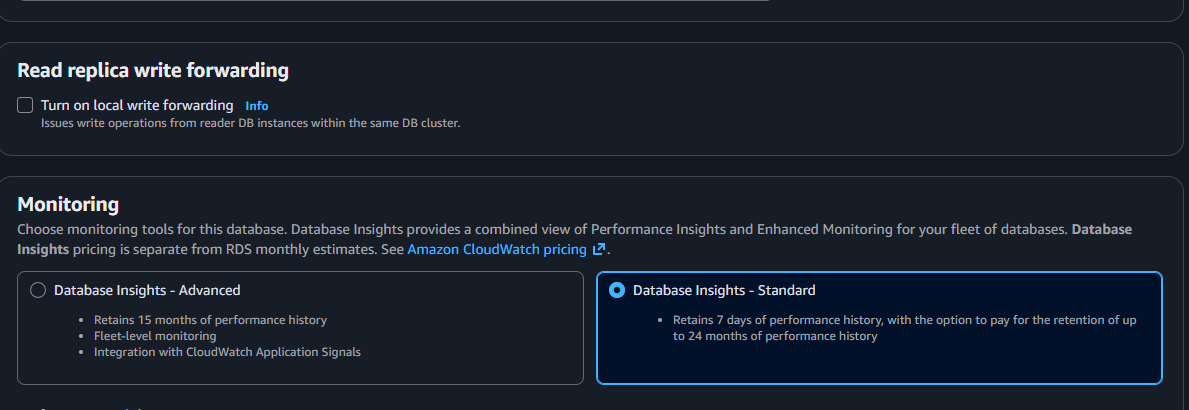
Continue, choose Apply immediately, and submit. The cluster and both instances briefly show Modifying while the setting propagates. Despite that status, there is no reboot and no downtime (AWS confirms this): the instances stay available and existing connections keep working. You only need to open a new session to start using forwarding.
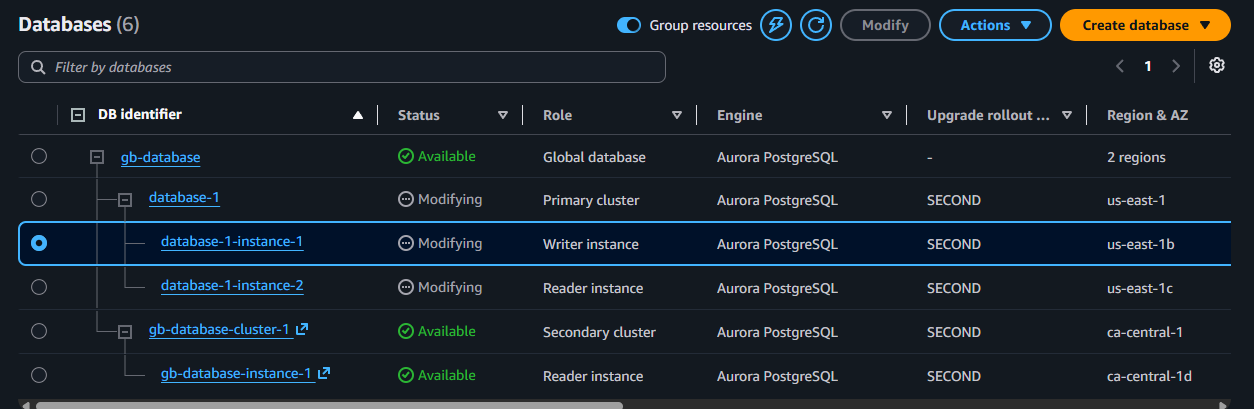
Wait until all of them return to Available.
The “after”: the same reader now takes the write
Open a fresh psql session (an old one opened before the change will not pick up forwarding) and run the exact same statements:
SELECT pg_is_in_recovery();      -- still t: still the reader
INSERT INTO products (name, category, price) VALUES ('wf-test', 'test', 1.00);
 pg_is_in_recovery
-------------------
 t

INSERT 0 1
That is the whole feature in two runs. pg_is_in_recovery() is still t, so you are still on a read replica, but the INSERT succeeded. The reader took the statement, forwarded it to the writer, and the writer committed it.
Explore this further in Cloning an Aurora PostgreSQL Cluster (Copy-on-Write)
The same thing in Python
import os
import psycopg

# One connection, pointed at the reader endpoint
conn = psycopg.connect(
    f"host={os.environ['READER_US']} port=5432 dbname=postgres "
    f"user=postgres password={os.environ['PGPASSWORD']} "
    f"sslmode=verify-full sslrootcert=/home/ubuntu/global-bundle.pem",
    autocommit=True,
)

with conn.cursor() as cur:
    cur.execute("SELECT pg_is_in_recovery()")
    print("on a reader:", cur.fetchone()[0])          # True

    # This would raise ReadOnlySqlTransaction before forwarding was on.
    cur.execute(
        "INSERT INTO products (name, category, price) "
        "VALUES ('wf-test', 'test', 1.00)"
    )
    print("write forwarded and committed")

    cur.execute("SELECT count(*) FROM products WHERE name = 'wf-test'")
    print("wf-test rows:", cur.fetchone()[0])
One endpoint for reads and writes
This is the practical payoff, and it answers the question directly: yes, your application can use a single endpoint for both reads and writes, and Aurora sorts out the rest. Point the connection at the reader endpoint, read from it as normal, and when a write comes through, Aurora forwards it to the writer:
conn = psycopg.connect(f"host={READER_ENDPOINT} ...", autocommit=True)

with conn.cursor() as cur:
    cur.execute("SELECT ... FROM products WHERE ...")   # read, served locally
    cur.execute("UPDATE products SET price = ... WHERE ...")  # write, forwarded
No more “writer connection here, reader connection there” branching in your code. Just remember the consistency setting below if a request needs to read back what it just wrote.
Controlling read-after-write with the consistency mode
Because a forwarded write commits on the writer and then replicates back, a read on the reader immediately afterward could momentarily miss it. The session variable controls how strict that is:
-- how fresh reads must be relative to your forwarded writes
-- eventual (fastest) | session (read your own writes) | global (strongest)
SET apg_write_forward.consistency_mode = 'session';
session is the default and the usual choice: within your session you always see your own writes. Use eventual for the lowest latency when slightly stale reads are fine, and global only when every reader must reflect the write before you continue.
Discover related concepts in Adding a Read Replica (Reader) to Aurora PostgreSQL
The global variant, and the cross-region catch
Global write forwarding is the same feature stretched across an Aurora Global Database. An app in a secondary Region points at the local reader endpoint for everything; Aurora forwards its writes back to the primary Region’s writer. You enable it on the secondary cluster (the Turn on global write forwarding checkbox), with no reboot.
There is a networking reality to plan for, and I hit it head-on trying to demo this. My test client lived in us-east-1 and the secondary reader was in ca-central-1. The connection simply timed out:

That is not a write-forwarding problem, it is a plain networking one: a client in one Region cannot privately reach a database in another Region. The two default VPCs both use the CIDR 172.31.0.0/16, which overlaps, so you cannot even peer them without rebuilding one in a custom range. In a real deployment this never comes up, because the app that uses the Canadian reader runs in Canada, next to it. The lesson: global write forwarding is for apps that live in the secondary Region, not for reaching across Regions from a single box.
Uncover more details in Adding an AWS Region to Aurora PostgreSQL (Global Database)
How much latency does it add?
Forwarding a write is not free, because the statement has to travel to the writer, commit, and come back:
- Local write forwarding: the hop stays inside the Region (often the same or a neighbouring Availability Zone), so the added write latency is small, typically low single-digit milliseconds. Reads are unaffected, they are served locally.
- Global write forwarding: each forwarded write pays the round trip between the two Regions. Short pairs (say
us-east-1toca-central-1) add little; distant ones (North America to Europe or Asia) add tens of milliseconds per write. AWS notes plainly that network latency between the secondary and the primary writer increases the time a forwarded write takes.
The consistency mode compounds this: global waits for the write to be globally visible before returning, eventual waits the least. Reads stay local and fast in every mode; it is only the forwarded writes that carry the distance cost. So write forwarding is ideal for read-heavy workloads with occasional writes, and less ideal for write-heavy ones from a far Region.
Journey deeper into this topic with S3 Files on EC2: Mount an S3 Bucket as a File System (the Honest Guide)
Can many Regions share one database without an instance in each?
Short answer: no, every Region you want to serve needs at least one running reader instance. A secondary Region can be headless (the cluster replicates storage but runs zero instances) to save money, but:
From AWS: a headless secondary cannot serve reads without instances. You add a reader instance back to the cluster when you need read capacity there.
So to give users in a Region low-latency local reads and write forwarding, that Region must have an instance, headless Regions serve no traffic until you provision one. That is separate from the networking point above: each Region’s application connects to its own local reader, so you do not need cross-Region VPC peering for a normal multi-Region app. You only run into peering if you try to have one central client reach every Region’s reader privately, which, as the timeout above showed, the default VPCs will not allow anyway.
Put together: run at least one instance per Region you serve, keep DR-only Regions headless to save cost, and let each Region’s app talk to its local endpoint.
Enrich your learning with Adding an AWS Region to Aurora PostgreSQL (Global Database)
Clean up
If you enabled this only to try it, turn it back off the same way (Modify the cluster, clear the checkbox). And if you spun up a global database or extra instances for the cross-region part, remember they bill per hour in every Region, so delete the secondary and any test instances when you are done. Removing a global secondary is Actions -> Remove from Global Database, then delete the cluster.
Gain comprehensive insights from Bash String Functions: Trimming, Case, and Reversal
Wrapping up
Write forwarding is a small feature with an outsized effect on application code: a reader can take a write, so one endpoint does both jobs. Locally it is nearly free and mostly a convenience; globally it lets a Region write to its own doorstep instead of across the planet, at the cost of the inter-Region round trip. Enable it per cluster, pick a consistency mode, keep an instance in every Region you serve, and mind that the write latency scales with distance. For the shell and SQL around this, see my Python Basics cheatsheet and the Ubuntu Terminal cheatsheet.
Master this concept through Adding an AWS Region to Aurora PostgreSQL (Global Database)
References and Further Reading
- Amazon Web Services. Local write forwarding in Aurora PostgreSQL.
- Amazon Web Services. Configuring Aurora PostgreSQL for local write forwarding.
- Amazon Web Services. Using write forwarding in an Aurora PostgreSQL global database.
- Amazon Web Services. Amazon Aurora PostgreSQL now supports local write forwarding.
Question
Would you route all traffic through a reader with write forwarding, or keep an explicit writer connection for your write path?
Similar Articles
Related Content
More from cloud
Atuin replaces your shell history with a searchable database: fuzzy matching, filter by directory, …
Cut AWS Lambda cost: what you are actually billed for, why more memory is rarely cheaper, the exact …
You Might Also Like
Livestream from your phone with Amazon IVS and no code, with every channel setting explained: …
Design an AWS Lambda system for a million users an hour: capacity math, concurrency, cold starts, …
Knowledge Quiz
Test your general knowledge with this quick quiz!
A set of multiple-choice questions to test your knowledge.
Take as much time as you need.
Your score will be shown at the end.
Question 1 of 5
Score: 0
Quiz Complete!
Your score: 0 out of 5
Loading next question...
Contents