Learn kubectl annotate step by step: add, overwrite and remove annotations, record …
/user/kayd
@
devops
:~$
cat ec2-s3-files-mount-bucket-file-system.md
S3 Files on EC2: Mount an S3 Bucket as a File System (the Honest Guide) S3 Files on EC2: Mount an S3 Bucket as a File System (the Honest Guide)


Karandeep Singh
• 10 minutes
Summary
Amazon S3 Files lets you mount an S3 bucket as a folder on EC2. This is the honest version, the setup gotchas (versioning, subnet, port 2049, a brutal Ubuntu build), how its latency compares to EBS and EFS, and whether Jenkins, config files, and logs belong on it.
In the EC2 storage guide we met the File systems panel and its four options: S3 Files, EFS, FSx, and None. The first one, S3 Files, is the newest and the most interesting: it takes an ordinary Amazon S3 bucket and makes it appear as a folder on your instance, so your programs read and write S3 as if it were a local disk.
That sounds like one click. It is not. This is the honest version, including a build detour that ate an afternoon, the four setup gotchas that will trip you, and, at the end, the three questions that actually matter: how fast is it compared to EBS and EFS, where should you use it, and can you run something real like Jenkins on it.
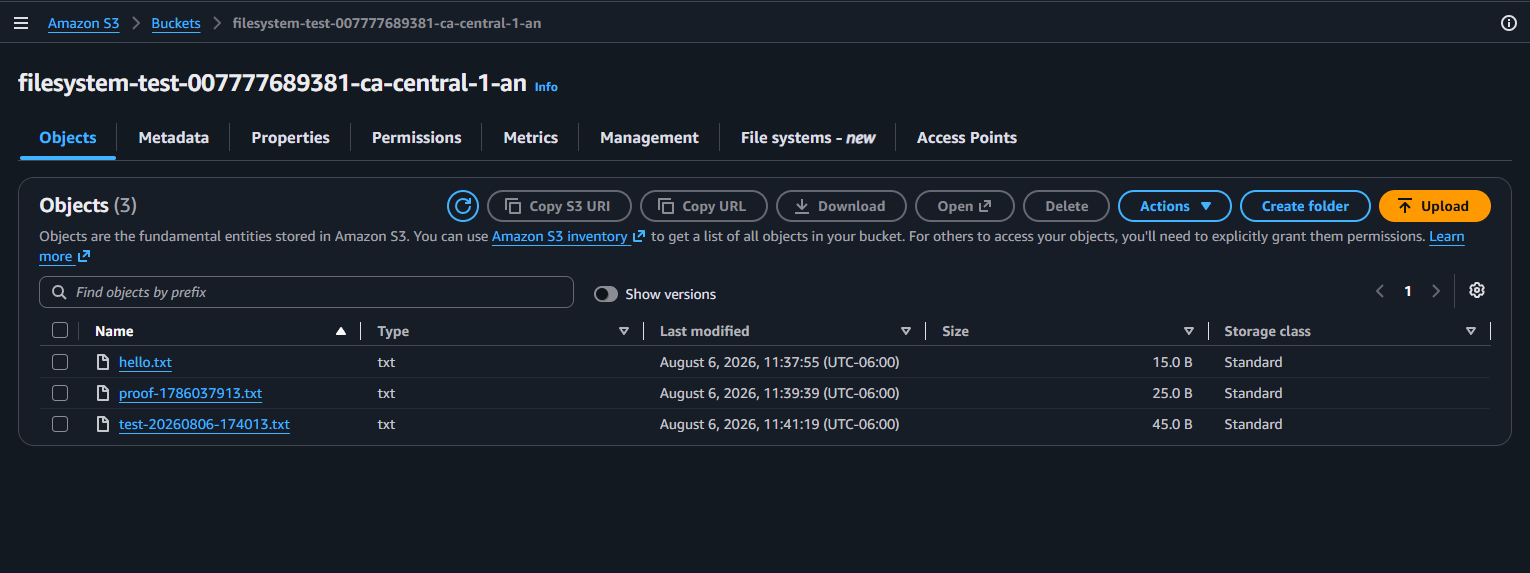
By the end I had three files written from an EC2 box showing up as objects in the bucket:
This is a follow-up to EC2 Storage in Plain English: Root Volumes vs File Systems. If root volume, EBS, and EFS are new to you, skim that first.
What S3 Files actually is
Amazon S3 Files is a managed file system that fronts an S3 bucket. AWS describes it as “a high-performance file system that seamlessly connects any AWS compute resource with Amazon S3.” Under the hood:
- You create a file system resource (an
fs-...id) that points at a bucket (or a prefix inside one). - It gets a mount target inside your VPC, exactly like EFS.
- On the instance you mount it with the
s3filesfilesystem type from theamazon-efs-utilsclient, which talks to the mount target over TLS. - Every file you see in the mount is a real S3 object. Write a file, and an object appears in the bucket.
So the mental model is: the folder is a live window onto a bucket. Nothing is copied onto the instance; the data lives in S3 and streams through the mount.
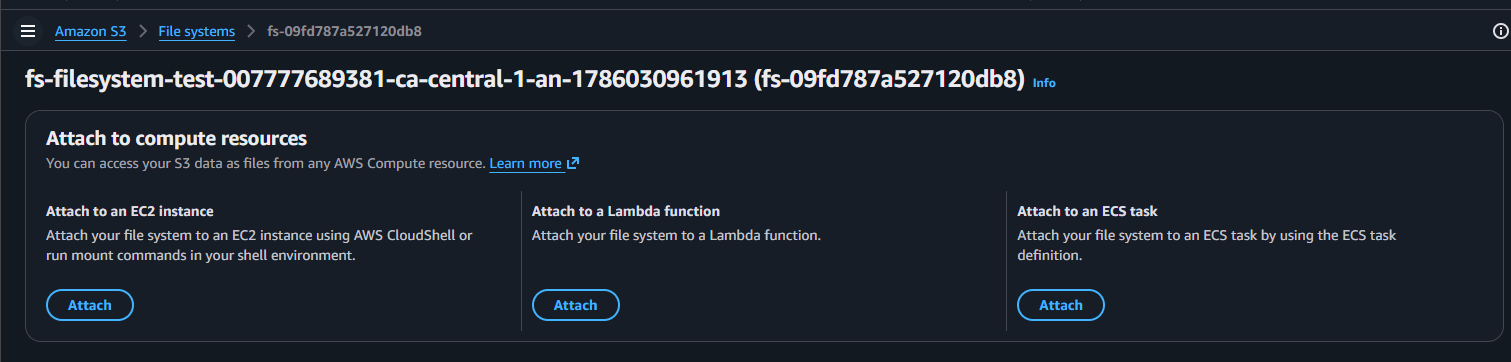
You can attach one file system to EC2, Lambda, or ECS:
Expand your knowledge with The Complete Guide to AWS S3 Static Website Hosting
Creating the file system (and the first two gotchas)
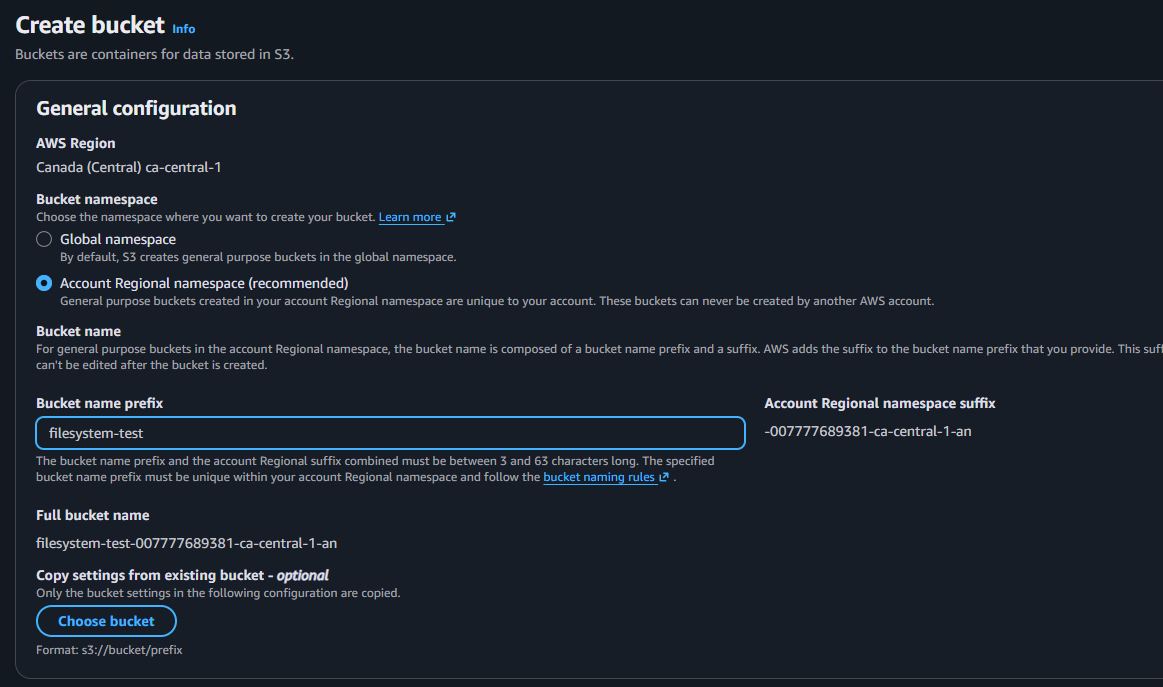
You create the file system from S3 → File systems → Create, pointing it at a bucket. I made a fresh bucket for it:
Gotcha 1 — the bucket must have Versioning enabled. Point the file system at a plain bucket and it refuses: “File systems require Bucket Versioning to be enabled for the bucket.” There is an Enable Bucket Versioning button right there; click it and continue.
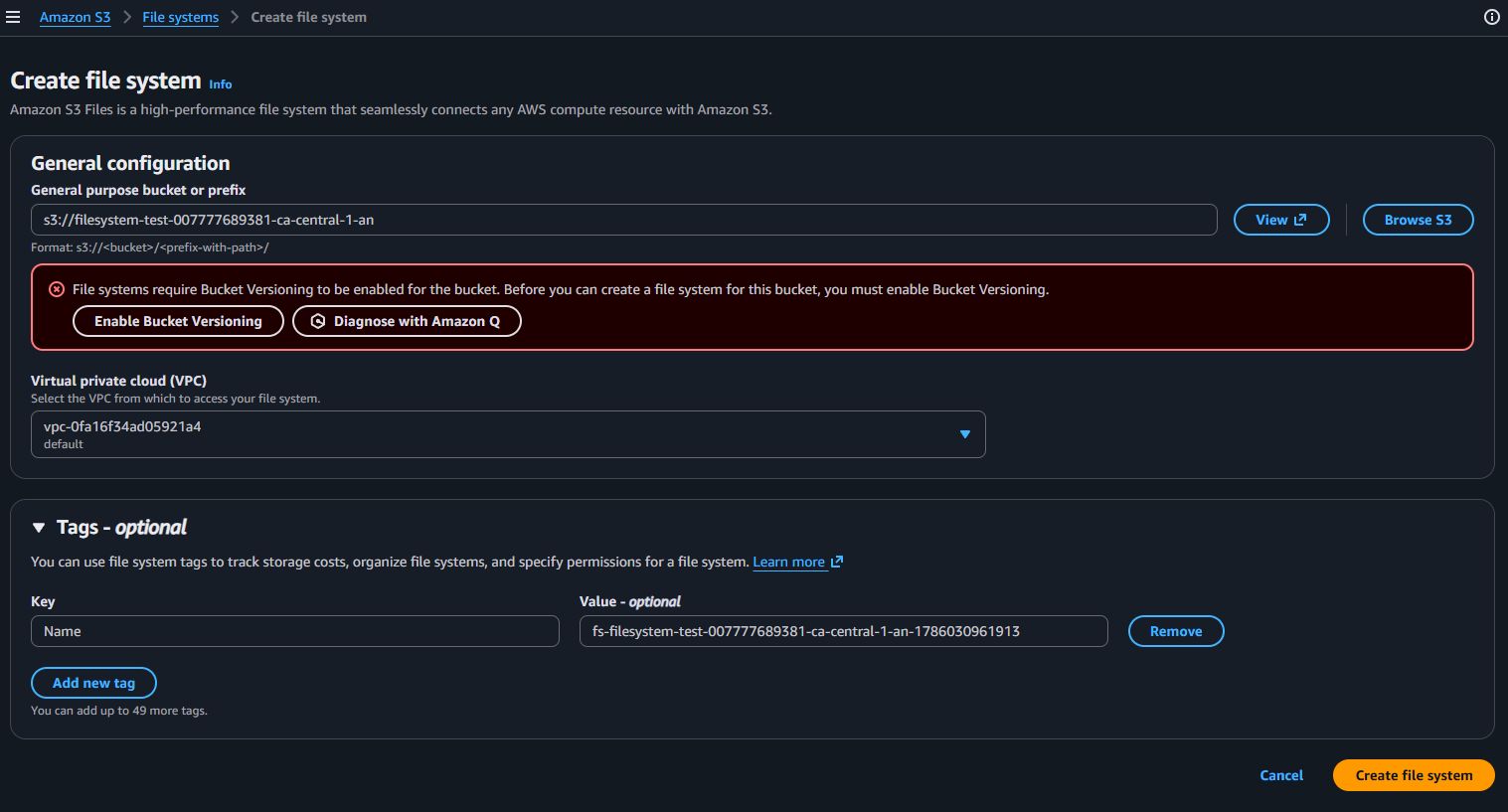
Once versioning is on, you pick the VPC and create it. AWS then provisions a mount target in your VPC, which takes a minute:

When it is Available, the overview shows the file system id, its ARN, and, importantly, an IAM role AWS auto-created so the file system itself can reach the bucket:
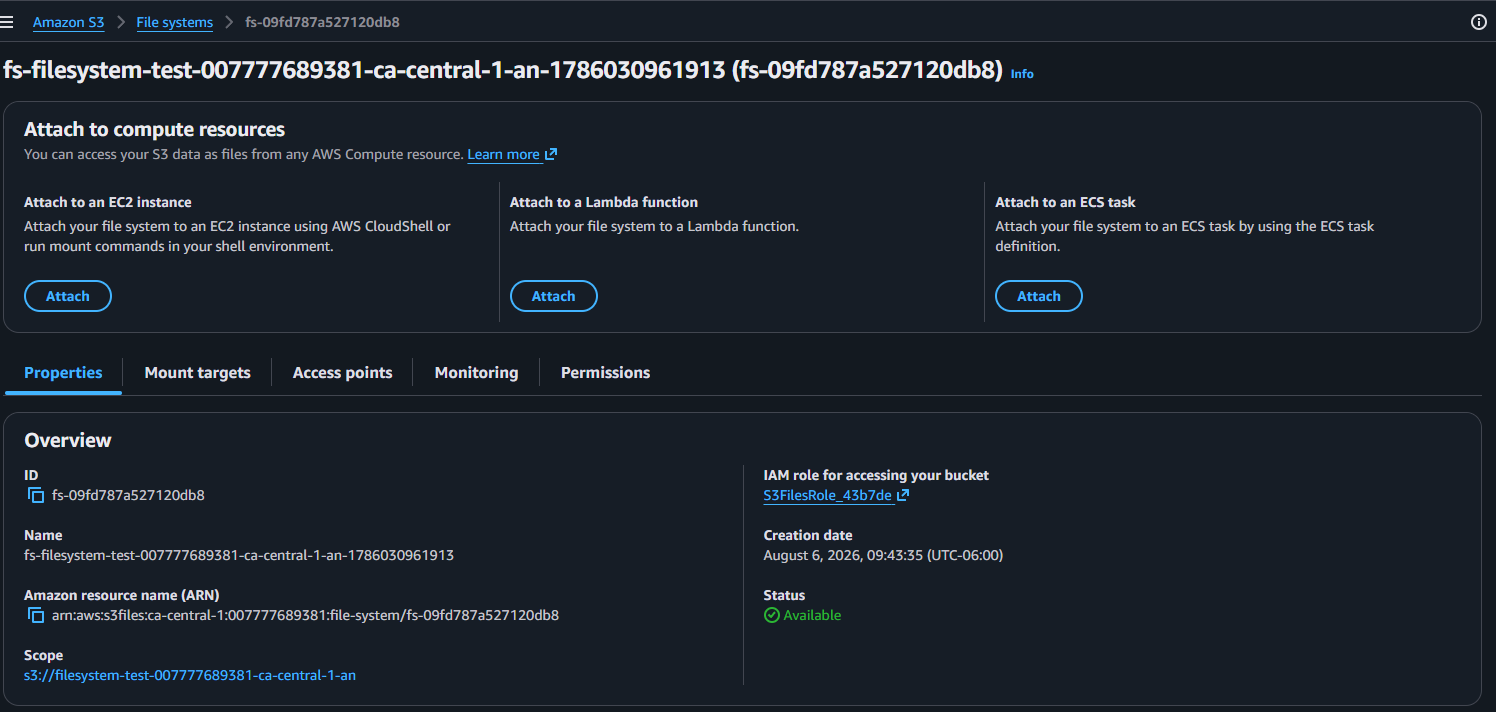
Deepen your understanding in EC2 Storage in Plain English: Root Volumes vs File Systems
Mounting it on EC2 (and the next two gotchas)
If you attach the file system from the EC2 launch wizard’s File systems panel, you hit the second gotcha immediately:
Gotcha 2 — S3 Files needs a specific subnet. In the launch wizard, the S3 Files option is disabled with “S3 file systems require a subnet” until you pick an explicit subnet in Network settings (not “No preference”). The mount target lives in a subnet, so the wizard has to know which one.
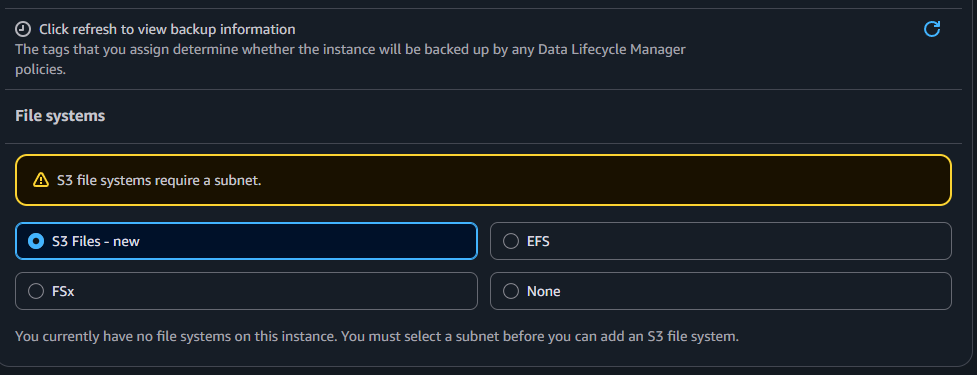
With a subnet chosen, you attach the file system, set a mount point (I used /mnt/s3), and the wizard hands you the exact mount command:
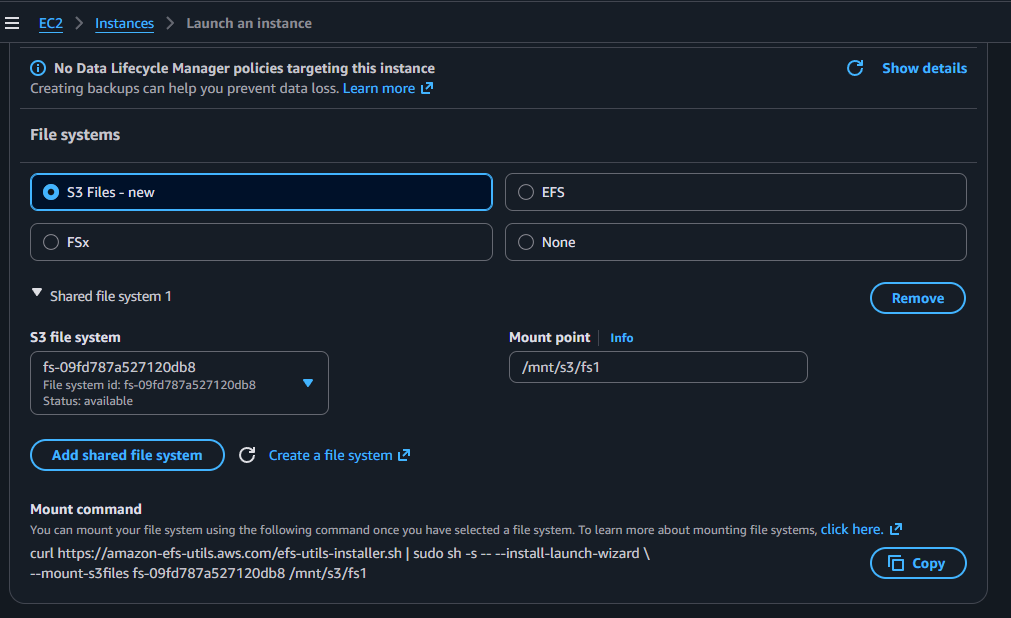
Installing the client — the easy way vs the afternoon I lost
That command installs the amazon-efs-utils client and mounts in one go:
curl -fsSL https://amazon-efs-utils.aws.com/efs-utils-installer.sh | \
  sudo sh -s -- --install-launch-wizard --mount-s3files fs-09fd787a527120db8 /mnt/s3/fs1
On a supported OS this just works — it downloads a prebuilt package, no compiler involved. On Amazon Linux 2023 it is even simpler:
sudo dnf install -y amazon-efs-utils
Here is the honest part. I was on Ubuntu 26.04, and the installer flatly refused it: ERROR: Unsupported operating system version 'ubuntu/26.04'. On an unsupported OS your only route is to build the client from source, and that turned into a gauntlet:
Gotcha 3 — building amazon-efs-utils from source on a too-new OS is brutal. In order, I hit: rustc too old (needs ≥ 1.94, install rustup), missing cmake, missing clang, missing Go (the FIPS crypto build needs it), an out-of-memory kill on a 1 GB t3.micro (the AWS-LC FIPS compile needs more RAM), the FIPS “delocate” failure because AWS-LC’s FIPS module does not build with GCC ≥ 14 / Clang ≥ 20 (fixed by using gcc-12), and finally a full 8 GB disk. It builds a .deb in the end, but it is a genuine afternoon.
The lesson: use a supported OS. Amazon Linux 2023 (dnf install amazon-efs-utils) or Ubuntu 24.04 LTS (the prebuilt installer works) turn this whole section into one command.
After building and installing the .deb, the mount helper exists at /sbin/mount.s3files, and you can mount manually:
sudo mkdir -p /mnt/s3
sudo mount -t s3files fs-09fd787a527120db8:/ /mnt/s3
Gotcha 4 — the mount times out until you open port 2049
My first mount attempt just timed out:
Mount attempt 1/3 failed due to timeout after 15 sec...
An S3 file system is reached through its mount target over TCP 2049 (NFS), exactly like EFS. The fix is a security-group rule: on the mount target’s security group, allow inbound 2049 from the instance (its security group or private IP). A quick reachability check:
nc -vz <mount-target-ip> 2049 # "succeeded" means the path is open
Once 2049 was open, the mount attached. And then a genuinely confusing thing:
Explore this further in EC2 Storage in Plain English: Root Volumes vs File Systems
findmnt /mnt/s3
# /mnt/s3  127.0.0.1:/  nfs4  rw,...,port=20185,...
df -h | grep s3files shows nothing even when it is working. The client runs a local efs-proxy and the mount appears as an nfs4 mount to 127.0.0.1. Grepping for “s3files” matches nothing. Use findmnt /mnt/s3 and look for the nfs4 type. (Corollary: if findmnt is empty, you are not mounted, and anything you write to that folder is landing on local disk, not S3.)Proving it works
With the mount real, writing files creates S3 objects:
echo "hello from ec2" | sudo tee /mnt/s3/hello.txt
echo "s3files works $(date +%s)" | sudo tee /mnt/s3/proof-$(date +%s).txt
ls -lh /mnt/s3
Refresh the backing bucket and there they are as objects (the screenshot at the top of this article). To persist the mount across reboots:
Discover related concepts in Tuning AWS Lambda for Cost: The Memory Myth, Measured
echo 'fs-09fd787a527120db8:/ /mnt/s3 s3files _netdev,nofail 0 0' | sudo tee -a /etc/fstab
How fast is it? Latency vs EBS and EFS
This is the question that decides most designs, so let us be blunt. S3 Files is built for throughput, not latency. Because every file is an S3 object reached over the network, per-operation latency is much higher than a local disk.
| Storage | Rough latency (per op) | Nature | Best at |
|---|---|---|---|
| EBS gp3 | sub-millisecond to low single-digit ms | Block, one instance | Low-latency random I/O, databases, OS/boot |
| EFS | low single-digit to ~tens of ms | Shared POSIX NFS | Shared files across many instances, general purpose |
| S3 Files | ~tens of ms first byte, throughput-oriented | Object-backed, shared | Large sequential reads/writes, big-data throughput |
Read that as orders of magnitude, not SLA numbers: EBS is fastest, EFS sits in the middle, S3 Files is the slowest per operation but scales throughput and capacity essentially without limit. The moment a workload does lots of small, random, latency-sensitive operations, S3 Files is the wrong tool. The moment it streams large objects or needs a bucket’s worth of data visible as files across many machines, S3 Files shines.
Uncover more details in Aurora Write Forwarding: Writing Through a Read Replica
Where to use it, and where not
Good fits:
- Reading large datasets straight from S3 — ML/AI training data, genomics, analytics over big files, without copying them onto a disk first.
- Writing new output files from a pipeline — rendered media, transformed data, batch results.
- Sharing a bucket’s data as files across many EC2/Lambda/ECS compute at once, without rewriting apps to use the S3 SDK.
- Cheap, effectively unlimited capacity where per-op latency does not matter.
Reach for something else when:
| You need… | Use instead |
|---|---|
| The OS / boot disk | EBS root volume |
| Low-latency random I/O, a database | EBS (io2 for heavy) |
| Small-file, in-place edits with locking | EFS |
| A Windows file share | FSx for Windows |
| Shared POSIX with full semantics | EFS |
The clean rule: big files, read-mostly or write-once → S3 Files. Small files, edited in place, latency-sensitive → EBS or EFS.
Journey deeper into this topic with Jenkins Security: Advisories, CVEs, and Hardening
Can you run full Jenkins on it?
Short answer: no — not the Jenkins home directory. JENKINS_HOME is thousands of small files with constant in-place updates (config.xml, job configs, build records), plus renames and file locking. Object-backed storage handles exactly none of that well, and the per-op latency would make the controller crawl. Putting JENKINS_HOME on S3 Files is asking for corruption and timeouts.
What does work is the split most teams already use:
JENKINS_HOME→ EBS (single controller) or EFS (if you need shared/HA controllers). This is where Jenkins wants a real POSIX filesystem.- Build artifacts and large outputs → S3 (via S3 Files or the S3 plugin). Big files, written once, read occasionally — a perfect S3 fit.
So: run Jenkins on EBS/EFS, and use S3 for the artifacts it produces. If you are baking the AMI that Jenkins host runs on, my Build Image with EC2 Image Builder Components piece pairs well with this split.
Enrich your learning with Jenkins LTS vs Weekly: Which Version Should You Use?
Can you store config files or logs on it?
Config files: it depends on the pattern. Read-mostly config distributed to many instances (write once, read at startup) works fine. But config that apps edit in place is a poor fit, and for small config a purpose-built store (SSM Parameter Store, AppConfig, or a plain S3 GetObject at boot) is usually better than a filesystem mount.
Logs: be careful here. Active log files are appended continuously, and object-backed file systems do not handle appends to an existing object well — a file maps to an object that is written once. So:
Gain comprehensive insights from Mastering NGINX Logs: Configuration and Analysis Guide
- Writing to a live, growing log file on the mount → no. Write logs to the local disk (EBS), rotate them, and then ship the rotated files.
- Archiving completed/rotated log files as new objects → yes, that is a great use — each rotated file is a new object.
- For real-time logs, CloudWatch Logs (or an agent shipping to S3) is the right pattern, not a live mount.
What it costs
There is no disk to provision — you pay ordinary S3 prices: storage per GB-month plus request costs (GET/PUT/LIST) and any data transfer. The client is free. For large, read-mostly datasets this is dramatically cheaper than keeping the same data on EBS or EFS. Nothing is stored on the instance, so terminating it leaves the bucket untouched — exactly what you want for data that should outlive the box.
Master this concept through Tuning AWS Lambda for Cost: The Memory Myth, Measured
Clean up
Terminate the instance (the mount just disappears). If you spun up a bigger box to survive the source build, terminate that too. Delete the file system and empty the bucket if you do not need them.
Delve into specifics at Bash String Functions: Trimming, Case, and Reversal
Wrapping up
S3 Files is a genuinely useful idea — give a bucket a filesystem face so ordinary programs can read and write it, shared across EC2, Lambda, and ECS. But it is not a general-purpose disk: it is a high-throughput, high-latency, object-backed mount. Use it for large data you read a lot and write once; keep databases, Jenkins homes, live logs, and anything latency-sensitive on EBS or EFS.
And save yourself the afternoon I lost: mount it from a supported OS (Amazon Linux 2023’s dnf install amazon-efs-utils, or Ubuntu 24.04 LTS with the prebuilt installer). The from-source build on a too-new distro is a rite of passage nobody needs.
For the wider storage picture, see the companion EC2 storage guide; and if you script against S3, the Python Boto3 cheatsheet is a handy companion.
Deepen your understanding in EC2 Storage in Plain English: Root Volumes vs File Systems
References and Further Reading
- Amazon Web Services. Mounting S3 file systems on Amazon EC2.
- Amazon Web Services. Prerequisites for S3 Files.
- Amazon Web Services. Amazon EBS volume types.
- Amazon Web Services. Amazon EFS performance.
- aws/efs-utils. Building from source.
Question
Would you mount a bucket with S3 Files for a real workload, or keep reaching for the S3 SDK, and where's your line between the two?
Similar Articles
Related Content
More from cloud
Atuin replaces your shell history with a searchable database: fuzzy matching, filter by directory, …
Cut AWS Lambda cost: what you are actually billed for, why more memory is rarely cheaper, the exact …
You Might Also Like
Livestream from your phone with Amazon IVS and no code, with every channel setting explained: …
Design an AWS Lambda system for a million users an hour: capacity math, concurrency, cold starts, …
Knowledge Quiz
Test your general knowledge with this quick quiz!
A set of multiple-choice questions to test your knowledge.
Take as much time as you need.
Your score will be shown at the end.
Question 1 of 5
Score: 0
Quiz Complete!
Your score: 0 out of 5
Loading next question...
Contents