Learn kubectl annotate step by step: add, overwrite and remove annotations, record …
/user/kayd
@
devops
:~$
cat python-for-devops-cheatsheet.md
Python for DevOps: Three Cheat Cards and the Traps Python for DevOps: Three Cheat Cards and the Traps


Karandeep Singh
• 14 minutes
Summary
Three printable Python cards covering the syntax, the four imports and the collections that DevOps work actually uses — plus the traps that will not fit on a card, each shown failing before it is fixed.
Nobody sets out to write Python for infrastructure. It arrives the way bash
arrives: a shell script needs to parse JSON, and jq is not installed, and
twenty minutes later there is a .py file in the repo that three services now
depend on.
So the Python most DevOps engineers write is a narrow slice of the language. Not
decorators and metaclasses — lists, a loop, requests, json, a Counter. I
put that slice on three cards. Each one is below — as a printable image, and
written out in full as text underneath it, because a picture of 11px code is
unreadable on a phone and you cannot copy a line out of it.
What a card cannot fit is the part that bites. Each one here comes with the traps that belong to it, shown failing first.
Card 1: Python basics
Lists, tuples, loops, functions, classes, lambda, sorting, comprehensions. The
examples are servers and pods rather than foo and bar, because that is where
you will use them.
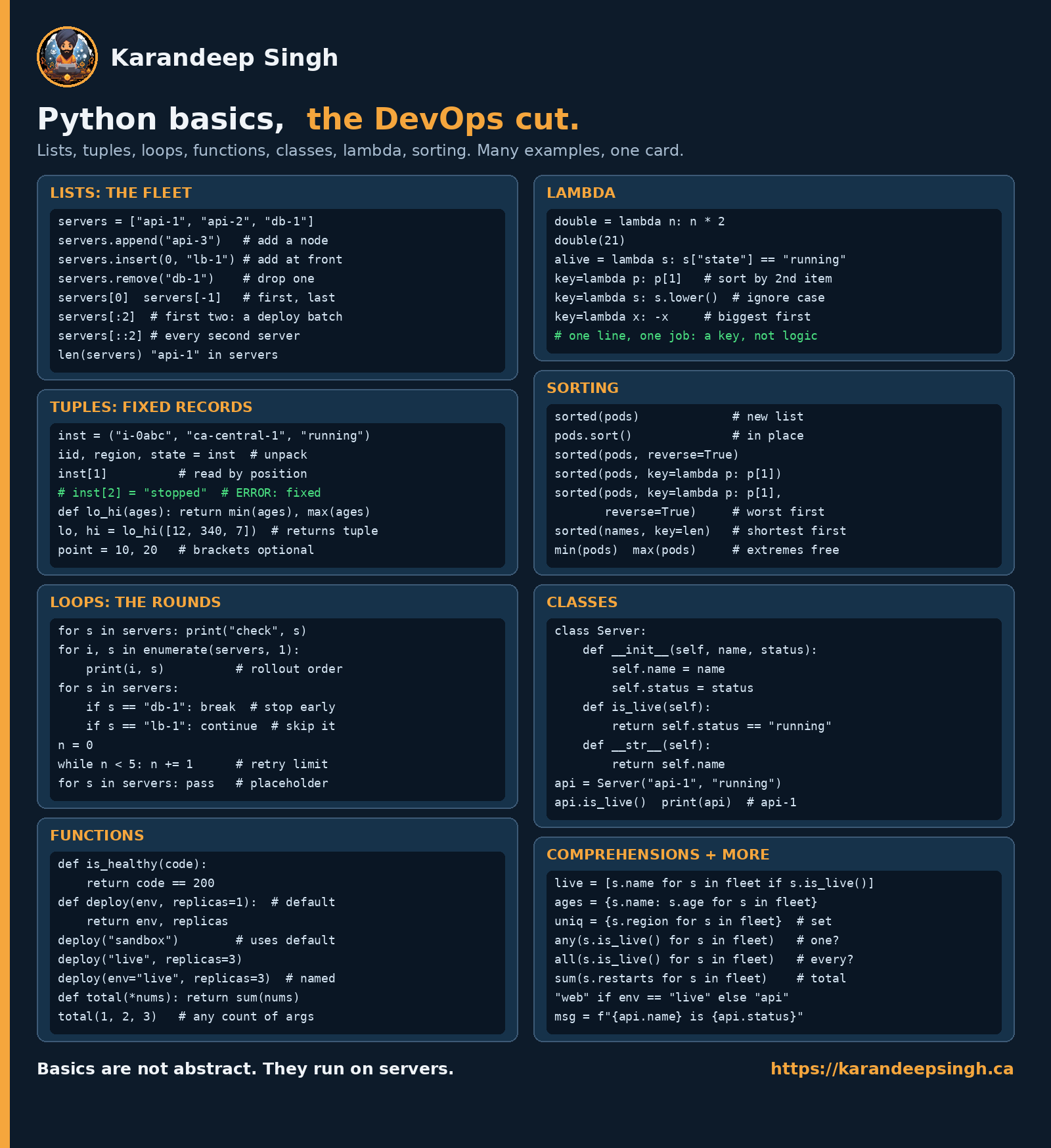
The card is for printing. Here is everything on it as text, so you can read it on a phone and copy a line straight out of it.
Lists and tuples
servers = ["api-1", "api-2", "db-1"]
servers.append("api-3")       # add a node
servers.insert(0, "lb-1")     # add at front
servers.remove("db-1")        # drop one
servers[0]   servers[-1]      # first, last
servers[:2]                   # first two: a deploy batch
servers[::2]                  # every second server
len(servers)                  # how many
"api-1" in servers            # membership
A tuple is a list that cannot change — which makes it the right shape for a record read out of an API:
inst = ("i-0abc", "ca-central-1", "running")
iid, region, state = inst     # unpack
inst[1]                       # read by position
# inst[2] = "stopped"         # ERROR: tuples are fixed

def lo_hi(ages):
    return min(ages), max(ages)

lo, hi = lo_hi([12, 340, 7])  # a function returning a tuple
point = 10, 20                # brackets optional
Loops and functions
for s in servers:
    print("check", s)

for i, s in enumerate(servers, 1):
    print(i, s)               # rollout order, numbered from 1

for s in servers:
    if s == "db-1": break     # stop early
    if s == "lb-1": continue  # skip this one

n = 0
while n < 5:
    n += 1                    # retry limit

for s in servers:
    pass                      # placeholder, does nothing
def is_healthy(code):
    return code == 200

def deploy(env, replicas=1):  # replicas has a default
    return env, replicas

deploy("sandbox")             # uses the default
deploy("live", replicas=3)
deploy(env="live", replicas=3)   # named arguments

def total(*nums):
    return sum(nums)

total(1, 2, 3)                # any count of arguments
Lambda and sorting
double = lambda n: n * 2
double(21)

alive = lambda s: s["state"] == "running"

key=lambda p: p[1]            # sort by the 2nd item
key=lambda s: s.lower()       # ignore case
key=lambda x: -x              # biggest first
# one line, one job: a key, not logic
sorted(pods)                  # a new list
pods.sort()                   # in place, returns None
sorted(pods, reverse=True)
sorted(pods, key=lambda p: p[1])
sorted(pods, key=lambda p: p[1], reverse=True)    # worst first
sorted(names, key=len)        # shortest first
min(pods)   max(pods)         # the extremes, free
Classes and comprehensions
class Server:
    def __init__(self, name, status):
        self.name = name
        self.status = status

    def is_live(self):
        return self.status == "running"

    def __str__(self):
        return self.name

api = Server("api-1", "running")
api.is_live()
print(api)                    # api-1 — this is what __str__ is for
live = [s.name for s in fleet if s.is_live()]   # list
ages = {s.name: s.age for s in fleet}           # dict
uniq = {s.region for s in fleet}                # set

any(s.is_live() for s in fleet)    # is one of them up?
all(s.is_live() for s in fleet)    # are all of them up?
sum(s.restarts for s in fleet)     # total

"web" if env == "live" else "api"  # inline conditional
msg = f"{api.name} is {api.status}"
sort() returns None
The single most common Python bug in a deploy script, and it does not fail where you wrote it:
servers = ["api-2", "api-1", "db-1"]
servers = servers.sort()      # looks reasonable, returns None
for s in servers:
    print("deploying", s)
$ python3 rollout.pyTraceback (most recent call last): File "rollout.py", line 4, in <module> for s in servers:TypeError: 'NoneType' object is not iterable$ echo $? → 1list.sort() sorts in place and returns nothing. sorted() returns a new
list and leaves the original alone. The rule that keeps you out of trouble: if
you are assigning the result, you want sorted(). If you are not, you want
.sort().
servers.sort()                 # mutate, assign nothing
ordered = sorted(servers)      # new list, original untouched
This is why the card lists them as a pair.
Default arguments are evaluated once
def deploy(env, hosts=[]):
    hosts.append(env)
    return hosts
That [] is created once, when the function is defined — not on each call.
Call it three times and the list keeps growing:
$ deploy("sandbox")['sandbox']$ deploy("staging")['sandbox', 'staging']$ deploy("live")['sandbox', 'staging', 'live']The fix is always the same shape:
-def deploy(env, hosts=[]):+def deploy(env, hosts=None):+ hosts = [] if hosts is None else hosts hosts.append(env) return hostsIt applies to every mutable default — [], {}, set(). Immutable defaults
like replicas=1 and env="sandbox", which the card uses, are fine.
A one-item tuple needs the comma
The card points out that the brackets are optional: point = 10, 20. What makes
a tuple is the comma, not the brackets, and that cuts both ways:
regions = ("ca-central-1")     # a string, not a tuple
regions = ("ca-central-1",)    # a tuple with one item
The first one will iterate character by character and your loop will run
thirteen times over c, a, -, c… This is a favourite in config code where
a list of regions is usually long and occasionally has one entry in it.
Lambdas in a loop capture the variable, not its value
The card’s rule for lambda is “one line, one job: a key, not logic.” Here is
the reason to keep it that narrow:
checks = [lambda: env for env in ("sandbox", "staging", "live")]
[c() for c in checks]          # ['live', 'live', 'live']
Every lambda closed over the variable env, and by the time they run, env
is "live". Used as a sort key — the card’s entire LAMBDA panel — the lambda
is called immediately and this never arises. Used to build a list of callbacks,
it will ruin an afternoon.
Expand your knowledge with Valkey on AWS ElastiCache: A Hands-On Guide
Card 2: Python imports — requests, json, yaml, click
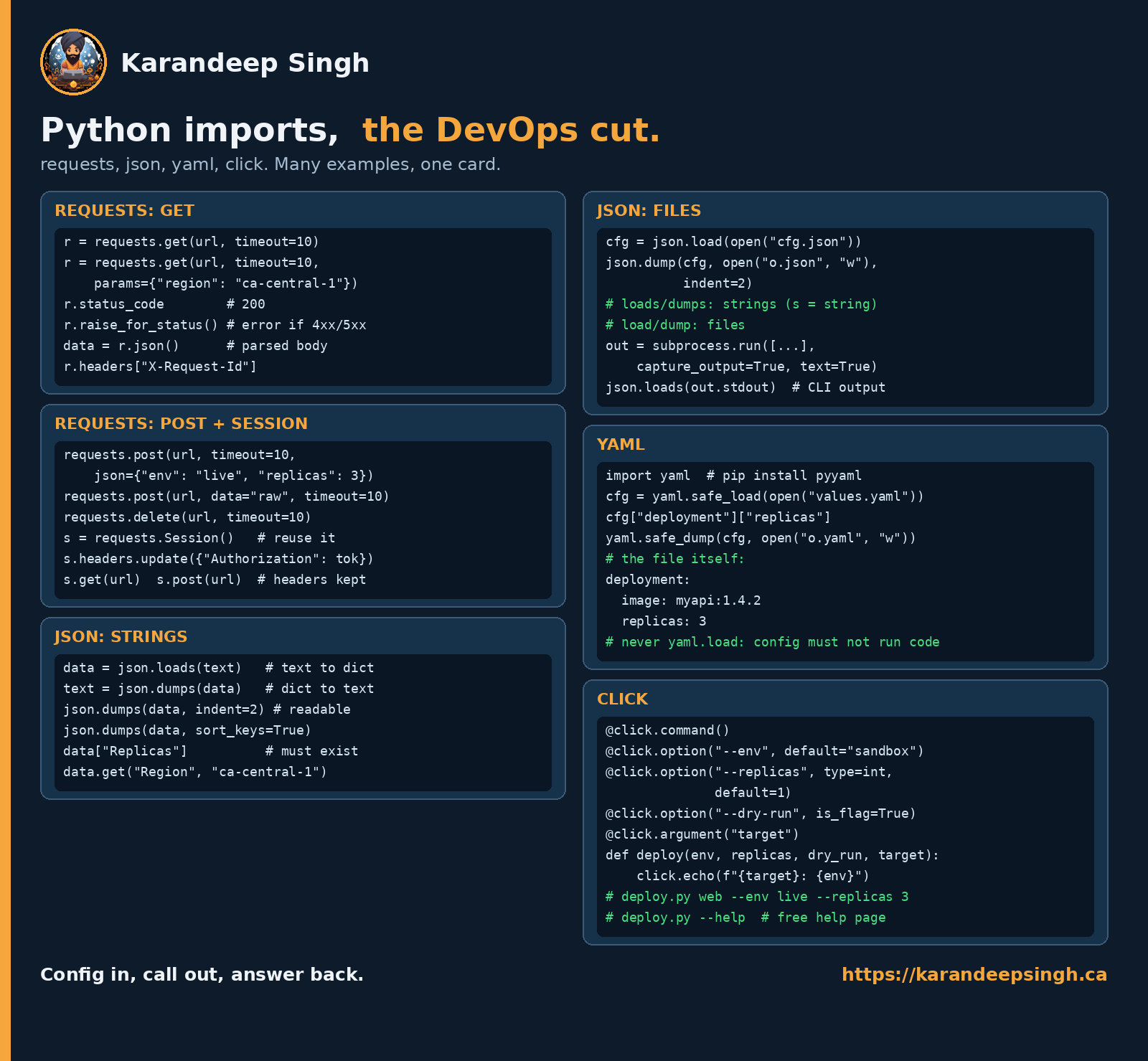
Four libraries cover most of what infrastructure Python does: call an API, read and write JSON, read and write YAML, and take command-line flags.
requests
r = requests.get(url, timeout=10)
r = requests.get(url, timeout=10,
                 params={"region": "ca-central-1"})
r.status_code                 # 200
r.raise_for_status()          # raise if 4xx/5xx
data = r.json()               # parsed body
r.headers["X-Request-Id"]
requests.post(url, timeout=10,
              json={"env": "live", "replicas": 3})
requests.post(url, data="raw", timeout=10)
requests.delete(url, timeout=10)

s = requests.Session()        # reuse the connection
s.headers.update({"Authorization": tok})
s.get(url)   s.post(url)      # headers are kept
json
data = json.loads(text)       # text  -> dict
text = json.dumps(data)       # dict  -> text
json.dumps(data, indent=2)    # readable
json.dumps(data, sort_keys=True)

data["Replicas"]              # must exist, or KeyError
data.get("Region", "ca-central-1")   # with a fallback
cfg = json.load(open("cfg.json"))
json.dump(cfg, open("o.json", "w"), indent=2)
# loads / dumps: strings  (the s is for string)
# load  / dump : files

out = subprocess.run([...], capture_output=True, text=True)
json.loads(out.stdout)        # parse a CLI's JSON output
yaml
import yaml                   # pip install pyyaml

cfg = yaml.safe_load(open("values.yaml"))
cfg["deployment"]["replicas"]
yaml.safe_dump(cfg, open("o.yaml", "w"))
# never yaml.load: config must not run code
The file it is reading:
deployment:
  image: myapi:1.4.2
  replicas: 3
click
@click.command()
@click.option("--env", default="sandbox")
@click.option("--replicas", type=int, default=1)
@click.option("--dry-run", is_flag=True)
@click.argument("target")
def deploy(env, replicas, dry_run, target):
    click.echo(f"{target}: {env}")

# deploy.py web --env live --replicas 3
# deploy.py --help      # the help page is free
Every requests call on that card has a timeout, deliberately
requests has no default timeout. None. A requests.get(url) against a
host that accepts the connection and then says nothing will block forever — not
sixty seconds, forever. In a cron job that means two copies tomorrow, then
three, until something runs out of memory.
r = requests.get(url)              # can hang until the heat death of the universe
r = requests.get(url, timeout=10)  # the only form worth typing
Make it muscle memory. There is no situation where the first line is the one you meant.
A 500 is a successful request
r = requests.get(url, timeout=10)
data = r.json()
If the server returned 500 Internal Server Error with an HTML error page,
requests considers that a complete success — it asked, it got an answer. The
failure surfaces further down as a confusing JSON decode error about an
unexpected <.
r.raise_for_status() turns a 4xx or 5xx into an exception at the line where
the problem actually is. Call it before you touch the body.
yaml.load runs whatever the file tells it to
This is the one on these cards with real consequences, which is why the card says never yaml.load: config must not run code.
Package configuration
Configuration pyyaml
yaml.load without an explicit Loader can construct arbitrary Python
objects — which means a YAML file can execute code when you parse it. A
values file from a pull request, a config fetched from a bucket, a chart someone
vendored: any of those is now remote code execution.
yaml.safe_load understands strings, numbers, lists and dicts, which is all a
config file ever legitimately needs.
Do you accept?
< safe_load >< load >
Modern PyYAML warns, and yaml.load(f, Loader=yaml.SafeLoader) is equivalent.
safe_load is shorter and harder to get wrong in review.
load is files, loads is strings
Both json and yaml use the same convention, and the card spells it out
because everyone reverses it at least once:
json.loads(text)— the s is for stringjson.load(open("cfg.json"))— a file object
The error when you get it backwards is TypeError: the JSON object must be str, bytes or bytearray, not TextIOWrapper, which is clearer than most but still
costs you a minute.
A Session keeps your headers — including the ones you did not mean to send
requests.Session() reuses the TCP connection, which is a real speed-up across
many calls, and it persists whatever you put in s.headers. That is the point,
and it is also the trap: a session carrying an Authorization header will send
that token to every host you then call with it. One session per API, not one
session per script.
Deepen your understanding in Mastering sed for YAML, JSON, TOML Config Files
Card 3: Python collections
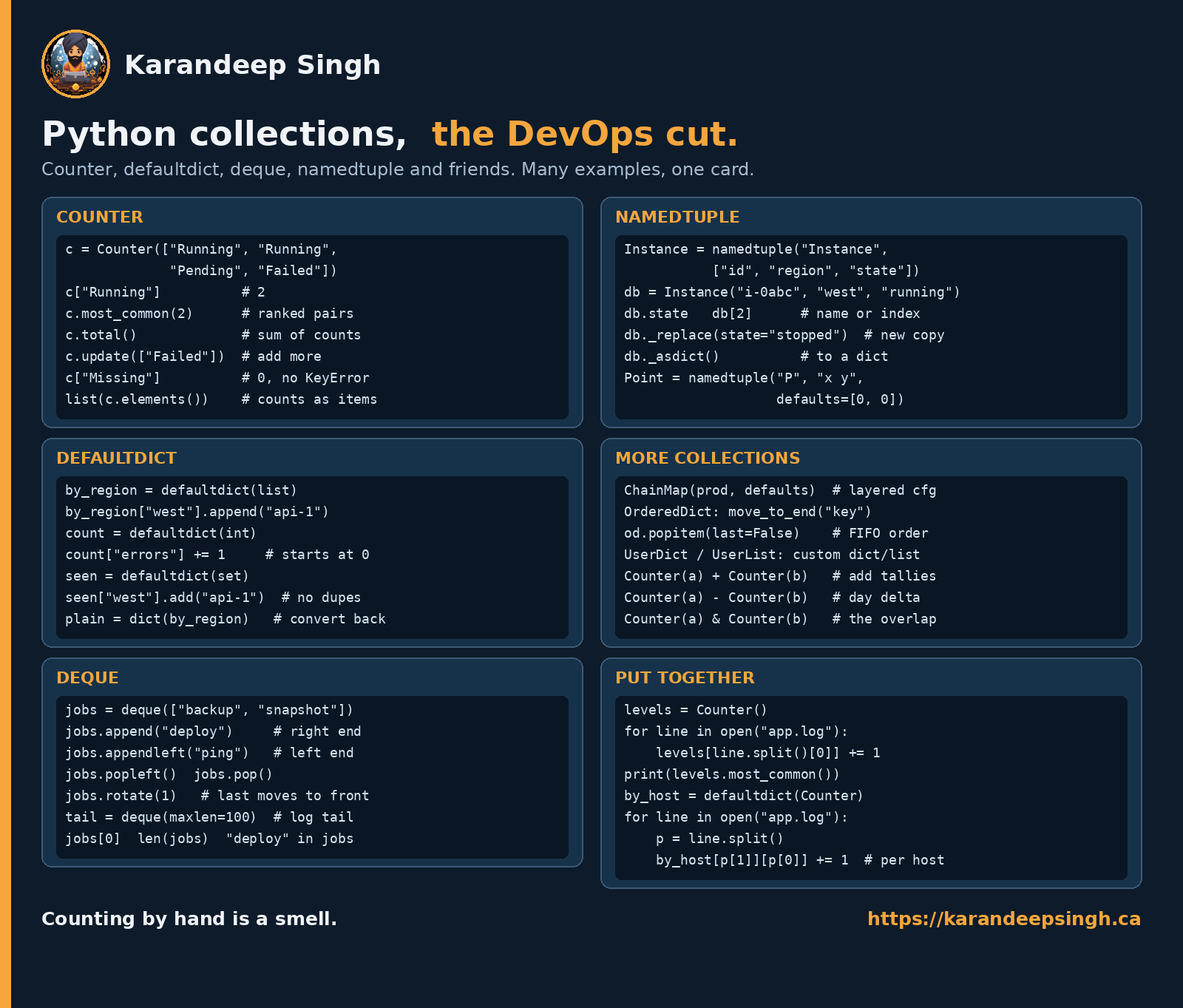
Counter, defaultdict, deque, namedtuple. The card’s footer is the whole
argument: counting by hand is a smell.
Counter and defaultdict
c = Counter(["Running", "Running", "Pending", "Failed"])
c["Running"]                  # 2
c.most_common(2)              # ranked (value, count) pairs
c.total()                     # sum of all counts
c.update(["Failed"])          # add more
c["Missing"]                  # 0, and no KeyError
list(c.elements())            # the counts expanded back to items
by_region = defaultdict(list)
by_region["west"].append("api-1")    # no need to create the key first

count = defaultdict(int)
count["errors"] += 1          # starts at 0

seen = defaultdict(set)
seen["west"].add("api-1")     # no duplicates

plain = dict(by_region)       # convert back to a normal dict
deque and namedtuple
jobs = deque(["backup", "snapshot"])
jobs.append("deploy")         # right end
jobs.appendleft("ping")       # left end
jobs.popleft()   jobs.pop()
jobs.rotate(1)                # last moves to the front
tail = deque(maxlen=100)      # a log tail, in one line
jobs[0]   len(jobs)   "deploy" in jobs
Instance = namedtuple("Instance", ["id", "region", "state"])
db = Instance("i-0abc", "west", "running")
db.state     db[2]            # by name or by index
db._replace(state="stopped")  # a new copy, original untouched
db._asdict()                  # to a dict

Point = namedtuple("P", "x y", defaults=[0, 0])
The rest of the module
ChainMap(prod, defaults)      # layered config, first match wins
OrderedDict: move_to_end("key")
od.popitem(last=False)        # FIFO order
UserDict / UserList           # subclass these for a custom dict/list

Counter(a) + Counter(b)       # add tallies
Counter(a) - Counter(b)       # the delta between two days
Counter(a) & Counter(b)       # the overlap
Put together
levels = Counter()
for line in open("app.log"):
    levels[line.split()[0]] += 1
print(levels.most_common())

by_host = defaultdict(Counter)
for line in open("app.log"):
    p = line.split()
    by_host[p[1]][p[0]] += 1   # per host, per level
Reading a missing key from a defaultdict creates it
This is the one that surprises people, because reading is supposed to be safe:
$ from collections import defaultdict$ by_region = defaultdict(list)$ by_region["west"].append("api-1")$ len(by_region)1# just LOOKING at a region we do not have:$ if by_region["east"]:> print("has hosts")$ len(by_region)2$ dict(by_region){'west': ['api-1'], 'east': []}The if statement added a key. Do that inside a loop over every region in your
account and the dict quietly fills with empty lists, then your summary reports
regions that have nothing in them.
To test without creating, use .get() or in:
if by_region.get("east"):        # no key created
if "east" in by_region:          # no key created
Counter behaves the opposite way, and that is useful
A Counter returns 0 for a missing key — the card notes c["Missing"] # 0, no KeyError — but unlike defaultdict, it does not insert it:
c = Counter(["Running", "Running", "Pending"])
c["Failed"]      # 0
len(c)           # still 2
So when you want “count things, and give me zero for ones I never saw”, reach
for Counter. When you want “group things into buckets”, reach for
defaultdict. The asymmetry is deliberate and worth remembering, because the
two look interchangeable on a card.
deque(maxlen=N) drops the far end silently
tail = deque(maxlen=100)
for line in open("app.log"):
    tail.append(line)           # keeps only the last 100
That is a ring buffer in one line, and it is the right tool for “keep the last N log lines in case something fails”. Just be clear that the dropping is silent — there is no signal that anything was discarded. If the count matters, count separately.
The underscore methods are public
namedtuple has _replace, _asdict and _fields. The leading underscore
normally means “internal, do not touch”, but here it exists so that the names
cannot collide with your field names. They are documented API. _replace
returns a new instance — a namedtuple is immutable, like the tuple on the
first card:
Explore this further in Valkey on AWS ElastiCache: A Hands-On Guide
db = Instance("i-0abc", "west", "running")
db._replace(state="stopped")     # a new Instance
db.state                         # still "running" — the original is untouched
Putting the three cards together
A triage script that uses all three — a loop and a comprehension from the first
card, requests and json from the second, Counter and defaultdict from
the third:
import json
from collections import Counter, defaultdict

import requests

levels = Counter()
by_host = defaultdict(Counter)

for line in open("app.log"):
    parts = line.split()
    if len(parts) < 2:
        continue                      # skip malformed lines, do not crash on them
    level, host = parts[0], parts[1]
    levels[level] += 1
    by_host[host][level] += 1

worst = sorted(by_host.items(), key=lambda kv: -kv[1]["ERROR"])[:3]

payload = {
    "totals": dict(levels),
    "worst_hosts": [{"host": h, "errors": c["ERROR"]} for h, c in worst],
}

r = requests.post(WEBHOOK, json=payload, timeout=10)
r.raise_for_status()
print(json.dumps(payload, indent=2))
Thirty lines, four imports, no dependencies beyond requests. That is the shape
of most useful infrastructure Python — and every trap above is one edit away
from being in it.
Discover related concepts in Bash String Functions: Search, Split, Count, Extract
When not to reach for Python
Python is the right tool when you need structure: nested data, real error handling, a dict of dicts. It is the wrong tool for gluing programs together, and it is the wrong tool for something you have to ship.
- Under about twenty lines of calling other commands — that is a shell script, and it will be shorter and clearer. The patterns are in Bash for Production.
- A binary for a server with no interpreter — Go, as a static binary with no runtime to install. That whole argument is Linux Commands to Go.
- In a Lambda where cold start matters — a large Python dependency tree is slow to start. Boto3 and AWS Lambda walks through a bill that got large for exactly this kind of avoidable reason.
Where Python wins outright is AWS automation with boto3, anything that parses
or reshapes data, and small tools where a --help page matters —
click gives you that for one decorator,
which is the whole reason it is on the second card.
Uncover more details in Valkey on AWS ElastiCache: A Hands-On Guide
Print them
Everything above is on the page as text. The cards are the same content laid out for a wall — one page each, and between them most of what you will type:
- Python basics — syntax
- Python imports — requests, json, yaml, click
- Python collections — Counter, defaultdict, deque, namedtuple
Pin the first one up while you are learning and the other two while you are building. The traps above are the part you only learn by hitting them, which is what the rest of this site is mostly about.
Journey deeper into this topic with Bash Code Shortening: Writing Concise Shell Scripts
References and Further Reading
Similar Articles
Related Content
More from devops
Atuin replaces your shell history with a searchable database: fuzzy matching, filter by directory, …
Cut AWS Lambda cost: what you are actually billed for, why more memory is rarely cheaper, the exact …
You Might Also Like
How I turned a Hugo blog into a public MCP server on Netlify — tools, resources and prompts over a …
Put Valkey in front of Aurora PostgreSQL with the cache-aside pattern in Python, and measure a real …
Contents